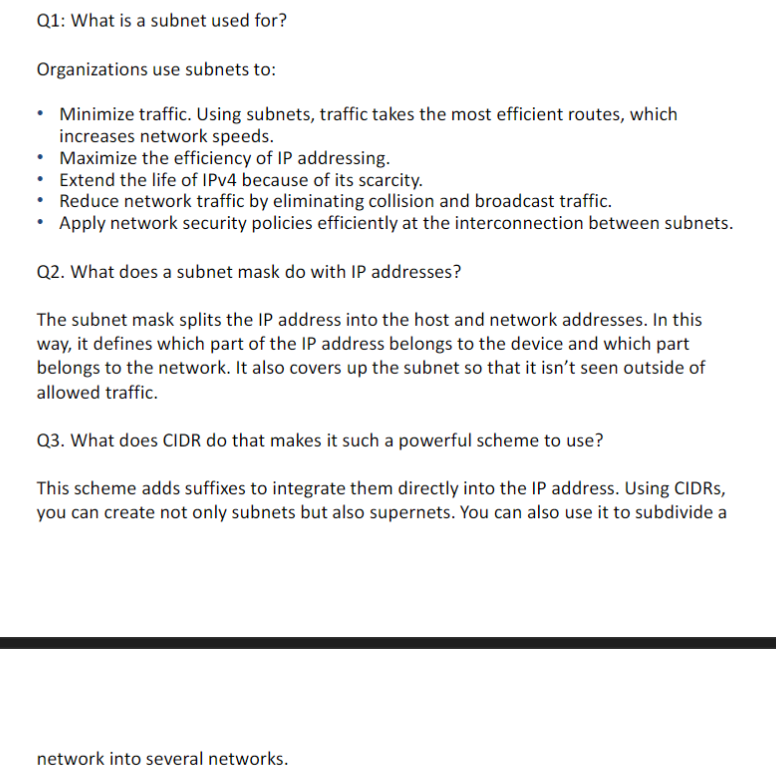
IP subnetting
Ip Address
We can connect to different devices and communicate together world wide via networking
each device has an IP address which is unique similar to our home address
ipconfig
running this command on the cmd shows the the network info of our device
we can see IPv4 ,IPv6 and subnet in it
- IPv4 (Internet Protocol Version 4):
IPv4 is the most commonly used IP address format, consisting of 32 bits, which allows for about 4.3 billion unique addresses (e.g., 192.168.1.1). It uses a dotted-decimal notation with four sets of numbers separated by periods. - IPv6 (Internet Protocol Version 6):
IPv6 is the newer IP version with 128 bits, allowing for a vastly larger number of unique addresses (approximately 340 undecillion addresses). It uses hexadecimal notation and colons to separate eight groups of four hexadecimal digits (e.g., 2001:0db8:85a3:0000:0000:8a2e:0370:7334). - Subnet:
A subnet is a smaller network within a larger network, created by dividing an IP address range. It helps organize and secure a network, as well as manage traffic more efficiently. Subnets are defined by a subnet mask (e.g., 255.255.255.0) that identifies the network and host portions of an IP address.
What is subnet
technique for logically partioning a single physical network into multiple small subnetworks called subnets
Benefits of Subnetting:
- Optimizes IP Address Usage: Helps avoid wastage of IP addresses by assigning just enough addresses to each subnet.
- Improved Performance: Reduces broadcast traffic by limiting it to the subnet.
- Enhanced Security: Limits exposure of sensitive data by isolating subnets.
- Scalability: Easier to expand a network by adding new subnets as needed.
- Simplified Routing: Reduces the size of routing tables, making network routing more efficient.
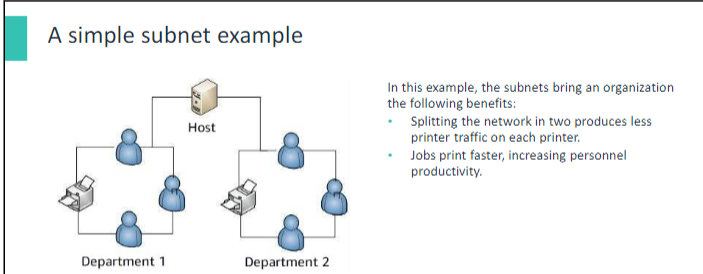
Classes we cannot use in a subnet
- Subnetting: Divides a larger network into smaller subnets by borrowing bits from the host ID, reducing hosts per subnet but increasing the number of networks.
- Example (Class C Address):
- Default:
192.168.1.0, Mask:255.255.255.0(1 network, 256 hosts). - Subnet: Borrow 1 bit, Mask:
255.255.255.128.- Subnet 1:
192.168.1.0 - 192.168.1.127. - Subnet 2:
192.168.1.128 - 192.168.1.255.
- Subnet 1:
- Default:
- Unsuitable Classes for Subnetting:
- Class D (224-239): For multicast; no host bits.
- Class E (240-255): Reserved for experimental use; unsupported by most networks.
- Practical Usage: Subnetting is most common with Class C networks.
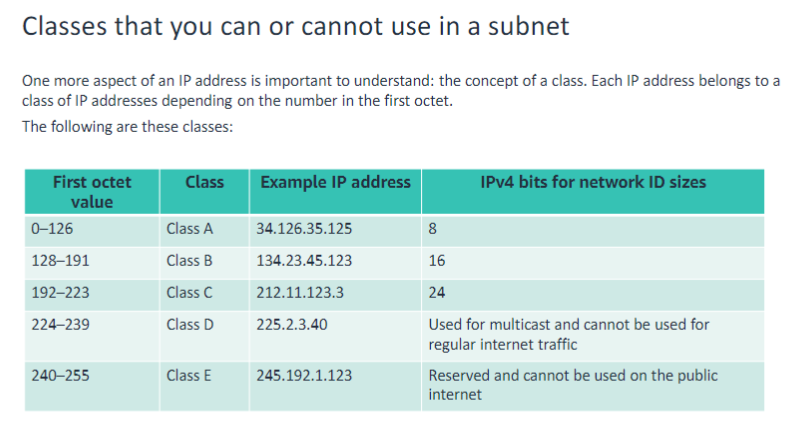
GPT of how borrowing works
How Borrowing Bits Works
- Every IP address has two parts:
- Network ID: Identifies the network.
- Host ID: Identifies devices (like computers) on that network.
When subnetting, you "borrow" some bits from the Host ID part and add them to the Network ID part.
- Effect:
- More subnets: You get more smaller networks.
- Fewer hosts per subnet: Each subnet can have fewer devices.
Example
Imagine you have a Class C network with this IP:
- 192.168.1.0 (Default Subnet Mask: 255.255.255.0)
- This means:
- Network ID: First 24 bits (192.168.1).
- Host ID: Last 8 bits (0–255), so 256 hosts are allowed.
Now, you want to divide this into 2 smaller networks:
- Borrow 1 bit from the Host ID (so now Network ID uses 25 bits).
- The new Subnet Mask becomes 255.255.255.128.
- This splits the original network into 2 subnets:
- Subnet 1:
192.168.1.0 – 192.168.1.127(128 hosts). - Subnet 2:
192.168.1.128 – 192.168.1.255(128 hosts).
- Subnet 1:
Parts of subnet
- Network ID: Uniquely identifies the subnet.
- Subnet Mask: A 32-bit number separating the network and host portions of an IP address.
- Host ID Range: Usable IP addresses within the subnet, excluding subnet and broadcast addresses.
- Usable Host IDs: Total devices that can be assigned unique IPs in the subnet.
- Broadcast ID: IP address for sending data to all devices in the subnet.
Subnet Mask
A subnet mask helps identify which part of an IP address refers to the network and which part refers to the device (host). It determines whether two devices are on the same network or need a router to communicate.
How It Works:
- Subnet Mask Format: It’s a 32-bit number made of 1s (network) and 0s (host).
- Example: 255.255.255.0 in binary is 11111111.11111111.11111111.00000000.
- Example:
- IP Address: 192.168.1.100
- Subnet Mask: 255.255.255.0
- Network ID: 192.168.1.0
- The first three parts (192.168.1) are the network, and the last part (100) is the host.
Why It’s Important:
- Communication: Devices with the same network ID (e.g., 192.168.1.100 and 192.168.1.50) communicate directly. Different networks (e.g., 192.168.1.100 and 192.168.2.100) need a router.
- Security: Splits networks into smaller segments, controlling traffic and improving security.
CIDR Notation:
- A subnet mask can be written as /24, meaning the first 24 bits are for the network (equivalent to 255.255.255.0).
In short, the subnet mask divides an IP address into network and host parts, helping devices communicate efficiently within or across networks.
What is CIDR Notation?
CIDR (Classless Inter-Domain Routing) notation is a shorthand way to represent an IP address and its associated subnet mask. It looks like this:
IP address / Number of bits
The number after the slash (e.g., /24) tells how many bits in the subnet mask are set to 1 (representing the network part of the address).
Example:
192.168.1.0/24
- IP Address:
192.168.1.0 - Subnet Mask:
/24means the first 24 bits are for the network, and the remaining 8 bits are for the hosts.- In dotted-decimal, the subnet mask is 255.255.255.0 (24 ones followed by 8 zeros).
Why Use CIDR Notation?
- Efficiency: It simplifies subnet representation instead of writing the full subnet mask.
- Flexibility: Allows dividing IP ranges into subnets of varying sizes (not restricted to fixed "Class A, B, C").
How to Calculate:
- IP Address: 192.168.1.0
- CIDR: /24 → Subnet mask is 255.255.255.0
- 11111111.11111111.11111111.00000000
- Usable IPs:
- 32 (total bits) - 24 (network bits) = 8 (host bits).
- Number of IPs = 28=2562^8 = 256.
- Usable IPs = 256−2=254256 - 2 = 254 (excluding network and broadcast addresses).
Examples of CIDR Notation and Subnets:
| CIDR Notation | Subnet Mask | Total IPs | Usable IPs | Network Size |
|---|---|---|---|---|
| /24 | 255.255.255.0 | 256 | 254 | Single Class C |
| /16 | 255.255.0.0 | 65,536 | 65,534 | Large networks |
| /30 | 255.255.255.252 | 4 | 2 | Point-to-point |
TL;DR:
CIDR Notation is a compact way to define how much of an IP address is for the network (e.g., /24) and how much is for the hosts. It’s essential for efficient IP allocation and subnetting.
how /16 gives 65k ips (GPT response)
-
CIDR Notation (/16):
- The /16 means the first 16 bits of the subnet mask are set to 1 (network portion), and the remaining 16 bits are 0 (host portion).
In binary:
Subnet Mask: 11111111.11111111.00000000.00000000 Dotted Decimal: 255.255.0.0 - The /16 means the first 16 bits of the subnet mask are set to 1 (network portion), and the remaining 16 bits are 0 (host portion).
-
IP Address Structure:
- An IPv4 address is 32 bits in total.
- For /16, the first 16 bits are for the network, and the remaining 16 bits are for the hosts.
Calculating Total IPs:
The number of IPs in a subnet is determined by the host bits (the bits available for devices in the network).
- Total bits: 32
- Network bits (/16): 16
- Host bits: 32−16=1632 - 16 = 16
The total number of IP addresses is:
2Host Bits=216=65,5362^Host Bits = 2^16 = 65,536
Usable IPs:
- Network Address: Reserved for identifying the network itself (e.g., 192.168.0.0).
- Broadcast Address: Reserved for sending data to all hosts in the subnet (e.g., 192.168.255.255).
So, the usable IP addresses are:
65,536−2=65,53465,536 - 2 = 65,534
Example:
For a /16 network like 192.168.0.0/16:
- Network ID: 192.168.0.0
- Broadcast Address: 192.168.255.255
- Usable IP Range: 192.168.0.1 to 192.168.255.254 (65,534 usable addresses).
Why So Many IPs?
The /16 subnet is large because it allocates 16 bits for hosts, meaning 65,536 possible IPs. This is suitable for organizations or large networks needing many addresses.